


Set Off Delay Time
1. If you are not already in the default screen, press the left arrow
key (key 3) until the screen looks similar to the image below.

2. Press the enter key (key 8). The screen will now appear as the image
below.

3. Press the down arrow key (key 6). The screen will now appear as
the image below.
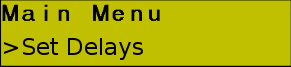
4. Press the right arrow key (key 5). The screen will now appear as
the image below.
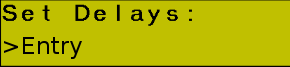
5. Press the down arrow key (key 6). The screen will now appear as
the image below.

6. Press the right arrow key (key 5). The screen will now appear as the
image below. Note that if this has been set before the numbers may not
be all zero's.
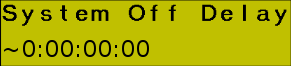
7. Enter the desired time from the key pad (keys 2). Let's say we want
to set the delay for 4 hours, no minutes, no seconds, and no
milliseconds.
Press key 0, key 4. At this point we could press the enter key (key 8)
so long as the rest of the unset numbers were at 0. Otherwise we keep
pressing the 0 key until the remainder are set, and then press the enter
key (key 8). This will return to the set delays menu as shown in step
6.
8. You can now press the left arrow key (key 3) until you have returned
to the default screen as shown in step 1.